Guía · Artículo 05 Guide · Article 05
Arregla las incidencias: Tareas y guías de arregloFix your issues: Tasks and fix guides
Tareas es tu lista de trabajo: agrupa las incidencias por tipo, te da la guía para arreglarlas y te deja marcar el avance. Y la biblioteca Aprende guarda la guía completa de cada detección.
1. Abre tus tareas
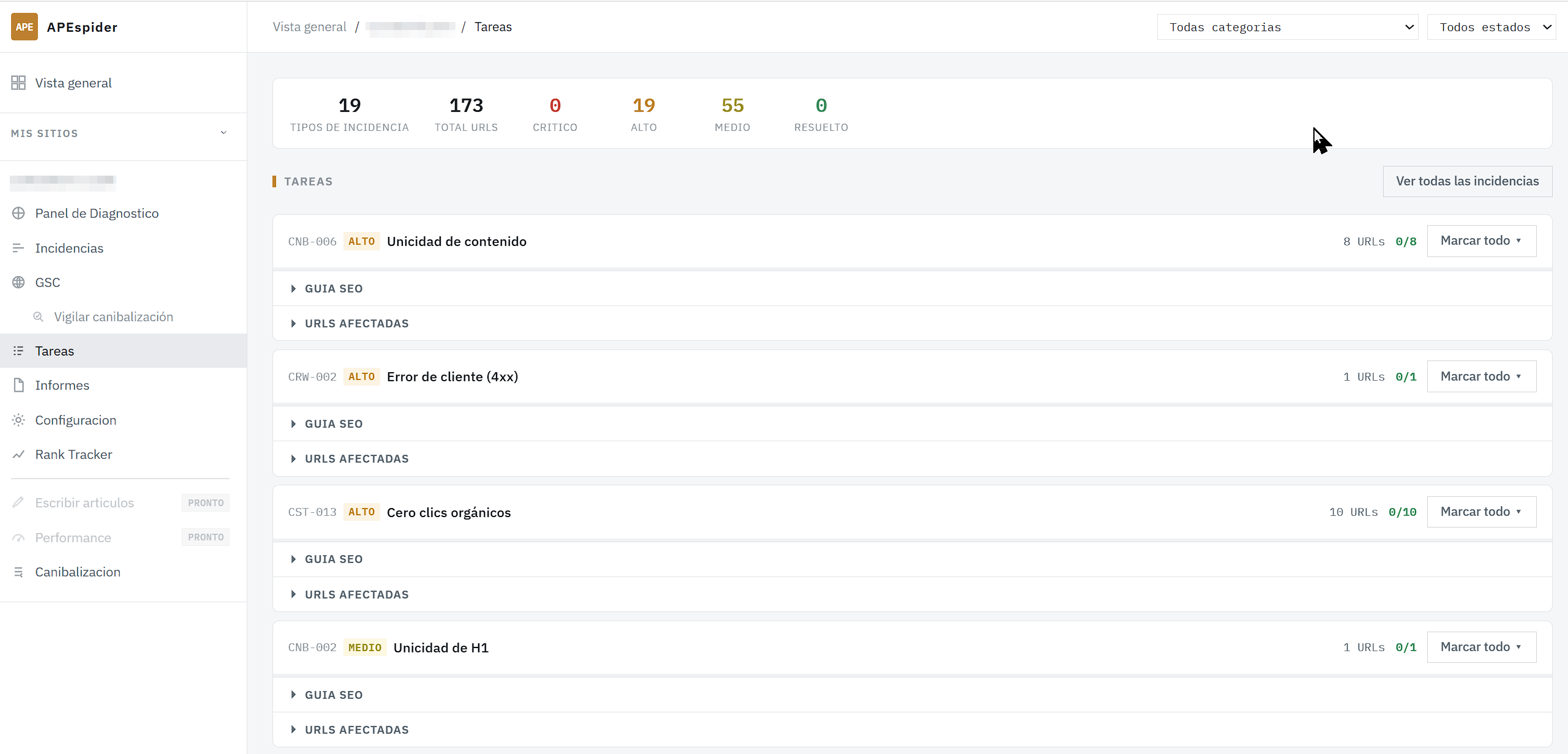
En el menú lateral del sitio, pulsa Tareas. Necesitas un rastreo completado; si no, verás «No hay rastreos completados. Ejecuta un rastreo primero para generar tareas.».
Arriba puedes filtrar por categoría (Todas categorías) o por estado (Pendiente / En progreso / Resuelto). Cada tarea muestra una barra de progreso y el número de URLs afectadas.
2. Sigue el progreso
Cada tarea trae acciones para marcar el estado de sus URLs: Marcar todo resuelto, Marcar en progreso, Marcar no aplica y Resetear a pendiente. Los estados posibles son Pendiente, En progreso, Resuelto y No aplica.
(También puedes cambiar el estado de una incidencia desde la columna Estado de la lista de Incidencias.)
3. Lee la guía de arreglo
Despliega Guía SEO dentro de una tarea. Verás cuatro bloques:
- Recomendación — qué hacer, en una frase.
- Cómo solucionarlo — los pasos, numerados.
- Consejos — matices y trucos.
- Por qué importa — el impacto de no arreglarlo.
Al final, Ver la guía completa → abre el artículo de esa detección en la biblioteca Aprende.
4. La biblioteca Aprende
Aprende (/learn) es la referencia de todas las detecciones de APEspider. Cada artículo (/learn/<detección>, por ejemplo /learn/soft-404) explica la Recomendación, Cómo solucionarlo (pasos), Consejos y Por qué importa. Está en español e inglés: añade ?lang=es o ?lang=en a la URL para forzar el idioma.
Qué hacer si algo falla: la lista de Incidencias todavía no enlaza a la guía artículo por artículo; el camino para leer la guía es Tareas → Guía SEO → Ver la guía completa. Cuando resuelvas algo, vuelve a lanzar un Rastreo completo para confirmar que la incidencia desaparece.
Tasks is your work list: it groups issues by type, gives you the fix guide, and lets you track progress. And the Learn library holds the full guide for every detection.
1. Open your tasks
In the site's side menu, click Tasks. You need a completed crawl; otherwise you'll see "No completed crawls. Run a crawl first to generate tasks.".
At the top you can filter by category (All categories) or by status (Pending / In progress / Resolved). Each task shows a progress bar and the number of affected URLs.
2. Track progress
Each task carries actions to set the status of its URLs: Mark all resolved, Mark in progress, Mark N/A, and Reset to pending. The possible statuses are Pending, In progress, Resolved, and N/A.
(You can also change an issue's status from the Status column in the Issues list.)
3. Read the fix guide
Expand SEO Guide inside a task. You'll see four blocks:
- Recommendation — what to do, in one line.
- How to fix it — the steps, numbered.
- Tips — nuances and tricks.
- Why this matters — the impact of not fixing it.
At the bottom, View the full guide → opens that detection's article in the Learn library.
4. The Learn library
Learn (/learn) is the reference for every detection APEspider can find. Each article (/learn/<detection>, e.g. /learn/soft-404) explains the Recommendation, How to fix it (steps), Tips, and Why this matters. It's in Spanish and English: add ?lang=es or ?lang=en to the URL to force a language.
What to do if something's off: the Issues list doesn't yet link to the guide article by article; the path to read the guide is Tasks → SEO Guide → View the full guide. Once you fix something, run a Full Crawl again to confirm the issue is gone.